Unlocking Your Potential as a Learning Designer: Why Articulate 360 is a Game-Changer for Aspiring Learning Designers
- Anh

- Dec 3, 2025
- 3 min read
In the dynamic world of Learning and Development (L&D), where technology meets pedagogy, the role of a learning designer stands out as a bridge between innovative ideas and impactful learning experiences. They are key players who combine pedagogy, creativity, and technology to design engaging learning solutions - from interactive courses to microlearning modules and simulations that keep learners curious, motivated, and informed. Whether you're a current student exploring e-learning tools, an alumnus transitioning into L&D roles, or an industry expert seeking to upskill your team, there’s one toolkit you’ll likely encounter: Articulate 360.
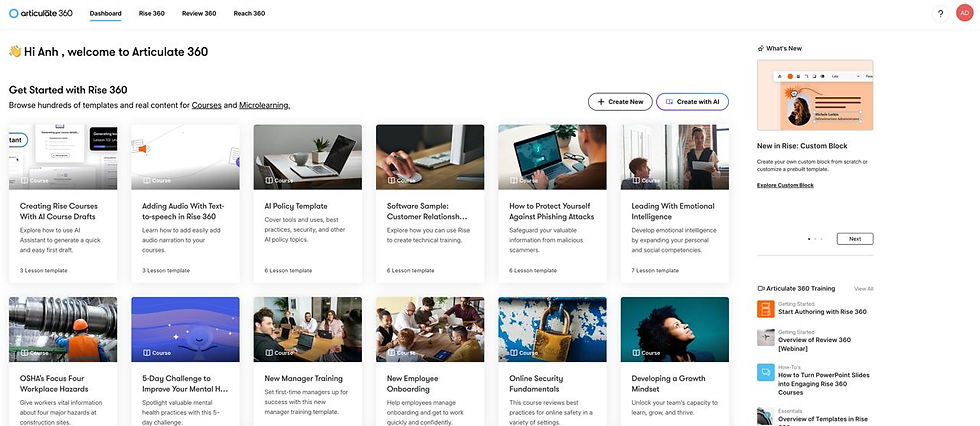
Imagine creating the blueprint for how people learn in the digital age: that's the essence of a learning designer. Learning designers analyze learner needs, apply adult learning theories, and blend multimedia elements to create interactive courses, simulations, and assessments. A learning designer’s responsibilities include:
Collaborating with subject matter experts to translate complex topics into bite-sized, engaging modules.
Using authoring tools to build responsive, accessible e-learning experiences.
Evaluating course effectiveness through analytics and iterating based on feedback.
Staying ahead of trends like microlearning, gamification, and AI-driven personalization.

Why Do We Need Articulate 360 in Your Toolkit?
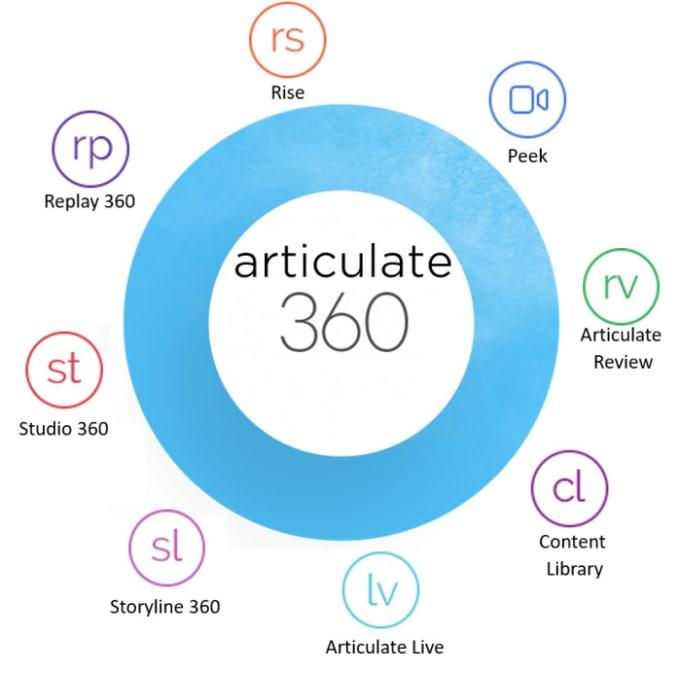
Articulate 360 is an all-in-one eLearning authoring suite that enables designers to create interactive, media-rich digital learning experiences without needing advanced programming skills. It’s widely used across corporate, higher education, and non-profit sectors, making it a valuable tool for anyone entering the field. The suite includes:
Storyline 360: A powerful tool for building fully customizable, interactive eLearning courses.
Rise 360: A web-based app for creating responsive, mobile-friendly courses quickly.
Review 360: A platform for collecting stakeholder feedback directly on your course content.
Content Library 360: A library of pre-built templates, characters, and stock assets to speed up design.
Articulate E-Learning Heroes Community (community.articulate.com): A hub of tutorials, templates, and forums where professionals share creative ideas.
Articulate 360 Training (articulate.com/360/training): 100+ videos/webinars on everything from AI Assistant to accessibility. Pro tip: Use keyword searches for hidden gold, like custom interactivity hacks.
Getting Started: How to Install Articulate 360?
You'll need a free Articulate account. The installation is straightforward and takes under 10 minutes.
Visit the official Articulate 360 website.
Click “Start Free Trial.”
Sign up using your university or personal email.
Download the Articulate 360 Desktop App, which manages installation and updates for all tools.
Once installed, launch the app to access Storyline 360, Rise 360, and others.
The Free Version: Duration and Maximizing Its Value
Articulate offers a 30-day free trial with access to the full suite of tools, including templates and content libraries. This is a golden time for students to build a portfolio, explore tools, and create sample projects that demonstrate design capabilities. So, how to make the most use of those 30 days?
Week 1: Onboard fast and explore the interface: Complete the built-in tutorials in Articulate 360 Training. You can build a simple Rise course on a topic from your course paper or any learning activity you’ve experienced before.
Week 2: Experiment Deeply: Dive into Storyline for custom interactions. Create a small interactive module using branching scenarios or quizzes to show your design thinking.
Week 3: Test your course with peers or mentors. Don’t forget to collaborate with people via Review 360 because the community is great for both feedback and networking. The AI function will help you translate the entire course for foreign learners or reviewers.
Week 4: Polish your project and publish it to your portfolio. You can also upload your work to Articulate Review to showcase it.

Keep in mind that the goal is to build at least one tangible piece you can showcase when applying for jobs or internships in Learning Design.
Articulate vs. Storyline: Clearing the Confusion
Many beginners confuse Articulate 360 with Storyline 360, but here’s the distinction:
Tool | Description | Best for |
Articulate 360 | The entire suite of apps for eLearning design and collaboration. | Professionals who want a full authoring ecosystem. |
Storyline 360 | A single application within the suite that creates interactive, customizable courses. | Advanced designers who want full control over interactions and courses. branching. |
How to Develop Your Learning Design Skills Further
Mastering Articulate 360 is only the beginning. To thrive as a Learning Designer, we should
Blend pedagogy with technology: Use your IT & Learning background to design meaningful experiences, not just attractive slides.
Design thinking and learning analytics: Understanding user behavior and data-driven insights can elevate your design.
Build a portfolio: Employers want to see your design process and outcomes.
Collaborate across disciplines. Partner with peers in media, education, or psychology—just like how ITL bridges theory and practice.
Stay reflective: Continuously evaluate what works and what doesn’t - Echoing the “thoughtful design” mindset.
So, open the free trial, start experimenting, and design the learning experience you wish you had. Bring your learning visions to life!


Comments